To give you an accurate quote for your solar or battery system, we’ll need a few photos from you. Don’t worry, it's quick and easy!
Here are the photos we may ask you for:
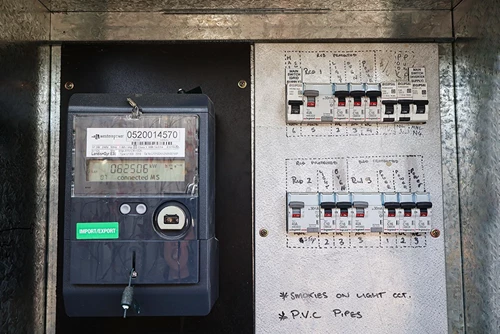
- A photo of your electricity meter box
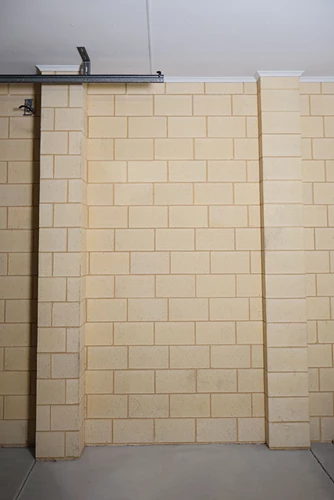
- Three photos of your preferred battery location
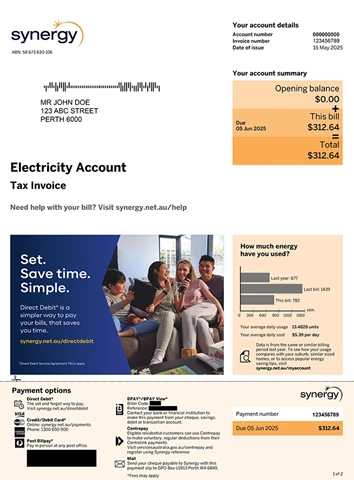
- A copy of your latest Synergy electricity bill
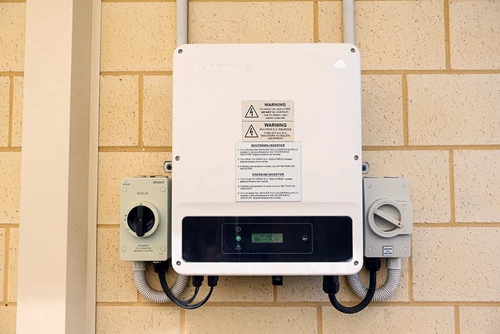
- A photo of your solar inverter (if you already have solar)
Check out our tips for how to take these photos below.
Photos of your electricity meter box
We need photos of your electricity meter box to check:
- if there’s enough space in your switchboard.
- whether your home has single-phase or three-phase power.
- if any upgrades are needed.
To take a good photo of your meter box:
- Stand directly in front of the meter box.
- Make sure the entire meter box is visible, including the power meter, switchboard, and all labels.
- Ensure the photo is clear (not blurry) so we can read the labels (zoomed in).
Where to find your meter box
You’ll usually find your meter box on an exterior wall of your home, near the front entrance, garage, laundry, or on the side of the house. It’s typically a metal box with a door that opens to reveal your electricity meter and switchboard.
Open the panel and snap a clear photo of the inside. It should look something like this:
Photos of where you’d like your battery to be installed
To help us confirm your preferred battery location is safe and meets installation requirements, please upload three photos of the spot where you’d like it installed. Common locations for batteries include a garage, external wall, or a utility or storage area.
Tips for taking a good photo
- Take photos from different angles to show the full area.
- Include nearby walls, windows, or vents for context.
- Make sure the photos are clear and not blurry.
Not sure where your battery should go? Check out our guide to the best spot for your battery (don’t worry, your installer will work with you if your preferred spot isn’t suitable).
A copy of your electricity bill
We’ll need a PDF copy of your latest Synergy bill to:
- check your energy usage and connection type.
- get your NMI for network approval with Western Power.
How to find your bill:
- Find it attached to your Synergy bill email
- Download it from your Synergy My Account, or
- Scan the full paper copy of your bill and save it as a PDF
We need all the pages of your bill to accurately prepare your Kleenheat Spark quote.
Solar inverter (if you have one)
If you already have a solar system, we’ll need a photo of your current inverter. This will help us understand your setup and provide the right upgrade or compatibility options.
Your inverter is usually a small metal box next to your switchboard.
How to take your photo
- Include the whole inverter unit in the frame
- Make sure the brand name and labels are visible
- Stand back far enough to show its position on the wall
It should look a little something like this:
Tip: If you can’t see your inverter near the switchboard, there is a chance you have a microinverter, a small unit attached to each individual panel on the roof. In that case, please snap a few extra photos of your switchboard from different angles.
Have any questions about these photos or images? You can reach out with your question here.